
Traditional mail houses are built for batch campaigns. You approve the creative, hand over the list, and wait. The process is linear, manual, and scheduled around production slots rather than customer behavior.
Direct mail automation is built differently. Instead of waiting for a campaign date, it fires when a customer does something: joins, lapses, renews, purchases. The piece goes out because the data said so, not because someone put it on a production calendar.
For marketing teams running high-frequency, behavior-triggered communications, that difference in model is significant. It affects cost, turnaround, control, and ultimately the response rates those campaigns produce.
Table of Contents
1. What Is Direct Mail Automation?
2. Direct Mail Automation vs. Traditional Mail Houses: How They Compare
3. Cost: Where the Real Difference Shows Up
4. Turnaround: Triggered vs. Scheduled
5. Why NextPage for Direct Mail Automation
1. What Is Direct Mail Automation?
Direct mail automation is a production system that triggers personalized mail pieces automatically based on customer behavior, data events, or milestones, without manual production initiation at each send.
Traditional direct mail runs on a fixed schedule. Direct mail automation runs on data. A new customer record fires a welcome kit. A lapsed account triggers a win-back piece. A renewal date approaching triggers a reminder. The system monitors the data, fires the trigger, and initiates production, without a team member manually kicking off each job.
By leveraging marketing automation technology and customer communication management (CCM) tools, direct mail automation software integrates directly with your existing CRM and marketing workflows, so triggers fire from the systems you already use.
2. Direct Mail Automation vs. Traditional Mail Houses: How They Compare
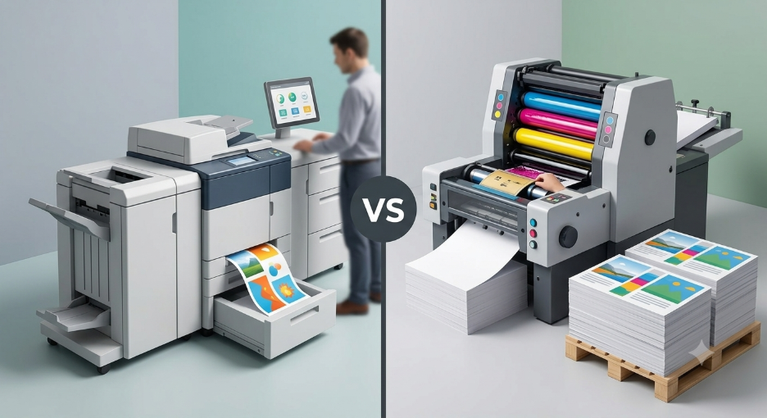
The fundamental difference between direct mail automation and traditional mail houses is not capability – it is model. Traditional mail houses are optimized for scale and volume. Automation is optimized for relevance and timing.
| Factor | Traditional Mail House | Direct Mail Automation |
| Send trigger | Fixed campaign schedule | Customer behavior or data event |
| Production initiation | Manual, per campaign | Automatic, per trigger |
| Turnaround | Days to weeks | Hours to 24 hours |
| Personalization | Batch: same piece for all | Individual: unique per recipient |
| Cost model | Per campaign, volume pricing | Per piece, predictable per trigger |
| Control | Handed off to mail house | Retained: data, template, rules |
| Scalability | Manual capacity limits | Scales with data volume automatically |
| CRM integration | Manual data export required | Direct connection via SFTP or API |
Neither model is universally right. A single annual catalog run at high volume belongs with a traditional print operation. A daily stream of welcome kits, renewal reminders, and win-back pieces belongs in an automated workflow.
Talk to NextPage About Automating Your Direct Mail →
3. Cost: Where the Real Difference Shows Up
Traditional direct mail services charge per campaign run. Every send carries setup costs: file prep, proofing, scheduling, and staff coordination. For teams sending multiple campaigns a month, those costs stack up fast.
And that is before accounting for missed timing: a win-back piece that should fire 30 days after a customer lapses but arrives 60 days later because it was batched into the next production slot is a less effective piece. That gap does not appear on the invoice, but it shows up in the response rate.
Automation front-loads the setup cost once and eliminates it from every subsequent send. The American College of Emergency Physicians saved $40,000 immediately after switching to NextPage’s automated workflow. Ferrellgas reduced production time from 10 days to 24 hours. For programs sending ongoing behavioral communications, automation consistently reduces total cost while improving relevance.
4. Turnaround: Triggered vs. Scheduled
Traditional mail houses operate on a production calendar. A typical campaign takes one to three weeks from brief to delivery. That timeline forces batch thinking – instead of asking when a customer is most likely to respond, the question becomes when the production slot is available. Those are very different questions with very different results.
Direct mail automation eliminates the calendar. When NextPage implemented automated direct mail for Ferrellgas, production dropped from 10 days to 24 hours. The triggered piece reaches the recipient at the moment of highest relevance: right after the behavior that prompted it, not weeks later. Ferrellgas doubled their response rate from 15% to 30% without changing the creative. Timing did the work.
See How NextPage’s Automation Workflow Runs →
5. Why NextPage for Direct Mail Automation
NextPage is a Kansas City direct mail automation provider connecting CRM data to personalized print production for marketing teams, healthcare organizations, financial institutions, and nonprofits.
- CRM and platform integration: Direct connection via SFTP or Web Service API.
- Secure data handling: SFTP via whitelisted IPs and encrypted data pathways.
- Template and rules configuration: Variable data templates built to your business rules.
- Automated production: Jobs fire, produce, and mail without manual intervention.
- Transparent billing: Detailed billing reports delivered automatically per run.
- Proven outcomes: Ferrellgas 2x response rate. ACEP $40,000 saved. 10 days to 24 hours.
Request a Direct Mail Automation Consultation →
6. Frequently Asked Questions
What is direct mail automation?
Direct mail automation is a production system that triggers personalized mail pieces automatically when a customer behavior or data event occurs, without manual production initiation at each send. It connects your CRM or marketing platform to a print and mail production workflow via SFTP or API.
How does direct mail automation compare to using a traditional mail house?
Traditional mail houses are optimized for scheduled, high-volume batch campaigns. Direct mail automation is optimized for triggered, behavior-based communications. Automation eliminates per-campaign setup costs, reduces turnaround from days to hours, and reaches recipients at the moment of highest relevance rather than on a fixed production schedule.
What is the best direct mail automation approach for ongoing campaigns?
The best direct mail automation for ongoing campaigns is trigger-based, meaning you set up workflows that will fire automatically when a customer hits a data threshold (opening a new account, lapsing a purchase, upcoming renewal date, etc.). It eliminates batch scheduling and gets every piece to the right person at the right time.
What direct mail automation software does NextPage use?
NextPage’s direct mail automation software infrastructure uses marketing automation technology and customer communication management (CCM) tools, integrated with client systems via SFTP or Web Service API. Template setup, data exchange, production, and billing are all managed within the automated workflow.
How much can direct mail automation reduce production costs?
NextPage’s direct mail automation software infrastructure is built on marketing automation technology and customer communication management (CCM) tools and is integrated with client systems via SFTP or Web Service API. An automated workflow takes care of template setup, data exchange, production, and billing.